HubSpot consulting
We take your CRM further with a strategy built around your process, automation designed for it, and training for your marketing, sales, and service teams.
- 35 HubSpot accounts under management
- 800+ hours of training delivered
- 500+ automations built
From a cluttered portal to an operation that runs smoothly
Six areas of work that cover the full cycle: understand, configure, automate, train, integrate, and support.
An assessment of your current CRM
We go through your portal in detail: properties, pipelines, permissions, integrations, and duplicate records. You end up with a report of what is misconfigured and what you are not using.
Implementation and setup
We configure HubSpot around the sales process you actually run: objects, properties, pipelines, permissions by team, and reports people open.
Workflow automation
We build the workflows that take out the manual work: lead assignment, follow-up sequences, internal alerts, automatic tasks, and rotation across reps.
Training for your teams
Hands-on sessions by role—marketing, sales, and service—in your own portal, with your own data. More than 800 hours of training delivered.
Integration with your other systems
We connect HubSpot to your ERP, your billing system, your website, WhatsApp, or anything with an API, so data moves in both directions and stops living in spreadsheets.
Support after go-live
We stay available once you are live: questions answered, settings adjusted, new automations, and regular reviews of the portal.
The difference between having HubSpot and HubSpot doing the work
Three specific things you can see in the portal when the implementation is done well. None of them come with the license; all three are configuration decisions.
Change 1 of 3
Every stage has a written exit criterion
A pipeline whose stages are only names works like a list of checkboxes: each rep moves the deal whenever it feels right, and the forecast stops meaning anything. We define what has to be true to move from one stage to the next, and we write it in the portal, where the team reads it as it drags the card.
- The forecast becomes comparable across reps, because everyone measures the same thing.
- A stalled deal shows up as time spent in a stage, not as a hunch.
- Stage conversion reports start to explain where the pipeline is lost.
Change 2 of 3
Work is handed out the moment it arrives
Assigning leads by hand costs hours and, worse, costs response time: the prospect who filled out a form on Friday gets the call on Monday. We build the workflows that route on what the record says, create the task with a due date, and notify whoever owns it, all at the same moment.
- We have built more than 500 automations inside client portals.
- Routing reads the record itself, not a separate rotation sheet.
- Every action is logged, so you can audit why a lead ended up where it did.
Change 3 of 3
Reports stop being argued about in the meeting
When the same contact exists three times, every number the portal produces is inflated, and the team knows it: that is why nobody believes it and everyone goes back to their own spreadsheet. Deduplicating, normalizing, and setting capture rules is what makes the management report and the rep's report say the same thing.
- Matching and survivorship rules are agreed with you before anything is merged.
- Fields that feed reports become required at the stage where they are already known, not at the first one.
- Moving dirty data into a new CRM only moves the problem: cleanup comes first.
What do you need your CRM to do?
We work with the full HubSpot suite. We start with the hub that clears your bottleneck and grow from there.
Marketing Hub
Campaigns, email, social, and landing pages in the same place the contact lives. Segmented lists that update on their own, and attribution that tells you where each opportunity came from.
- Active lists that recalculate when the contact changes
- Nurturing workflows triggered by behavior
- Landing pages and forms without touching code
- Email by segment with A/B testing
- Revenue attribution by channel and by campaign
- Social publishing and ads connected to the CRM
Sales Hub
A pipeline with stages that mean something, follow-up sequences, templates, and tasks. The team stops keeping notes on the side, and the forecast is built from what is already logged.
- Separate pipelines for each line of business
- Sequences that stop as soon as the prospect replies
- Templates, snippets, and documents with open tracking
- Meetings with their own calendar and a public link
- Forecasting by stage and by rep
- Call recording with transcription
Service Hub
Tickets, a shared inbox, a knowledge base, and satisfaction surveys. It helps you answer faster and spot what gets asked so often that it is worth documenting.
- Shared inbox with tickets and agreed response times
- Knowledge base, public or for customers only
- A portal where the customer sees their own tickets
- Satisfaction, effort, and recommendation surveys
- Routing by team, working hours, and availability
- Live chat and bots on your site
Content Hub
Your site, blog, and landing pages inside HubSpot, with SEO recommendations and A/B testing. This is where our development service lives: themes, templates, and modules.
- Site, blog, and landing pages in the same portal
- Custom themes and modules that marketing can edit
- SEO recommendations by page and by topic
- Content restricted by membership
- A/B tests and adaptive pages
- Traffic reports tied to the contact behind the visit
Formerly CMS Hub
Data Hub
Two-way sync with the rest of your software, formats corrected by data quality rules, duplicates removed, and room to code your automation when a workflow falls short.
- Two-way sync with more than a hundred apps
- Format rules that fix the data as it comes in
- Duplicate contacts and companies detected and merged
- Custom code actions and webhooks inside a workflow
- Datasets and Data Studio to blend sources
- Connectors to your company's data warehouse
Formerly Operations Hub
Revenue Hub
Quotes with pricing rules, contracts, subscriptions, invoices, and payments on the same deal record. It closes the loop between the sale and what ends up in accounting.
- Product library with pricing and discount rules
- Quotes with e-signature and online payment
- Contracts as a record of their own, linked to the deal
- Subscriptions and recurring billing, with mid-term changes
- Invoices and payments by card, bank transfer, and direct debit
- Two-way sync with QuickBooks and Xero
Formerly Commerce Hub
Agent Hub
HubSpot's newest product, and where Breeze agents are built and managed. It is still in public beta, so here we work with whatever is already released in your portal.
- Agents with their own instructions, sources, and tools
- A customer agent that answers from your knowledge base
- Content and prospecting agents working on CRM data
- Actions that create and update records
- A log of what each agent did and which source it used
- Usage metered in portal credits
Smart CRM
The foundation the others run on, not one more hub you buy separately. One record per company and per person, which every hub reads and writes.
- Custom objects and properties that fit how you operate
- Labeled associations between records
- Permissions and teams by role and by region
- Shared views, lists, and filters
- Change history property by property
- A single record that feeds every report
Three screens from a portal that already works on its own
These are HubSpot's own product images, with demo data and the interface in English. They are not client portals: what they show is where the configuration takes you.
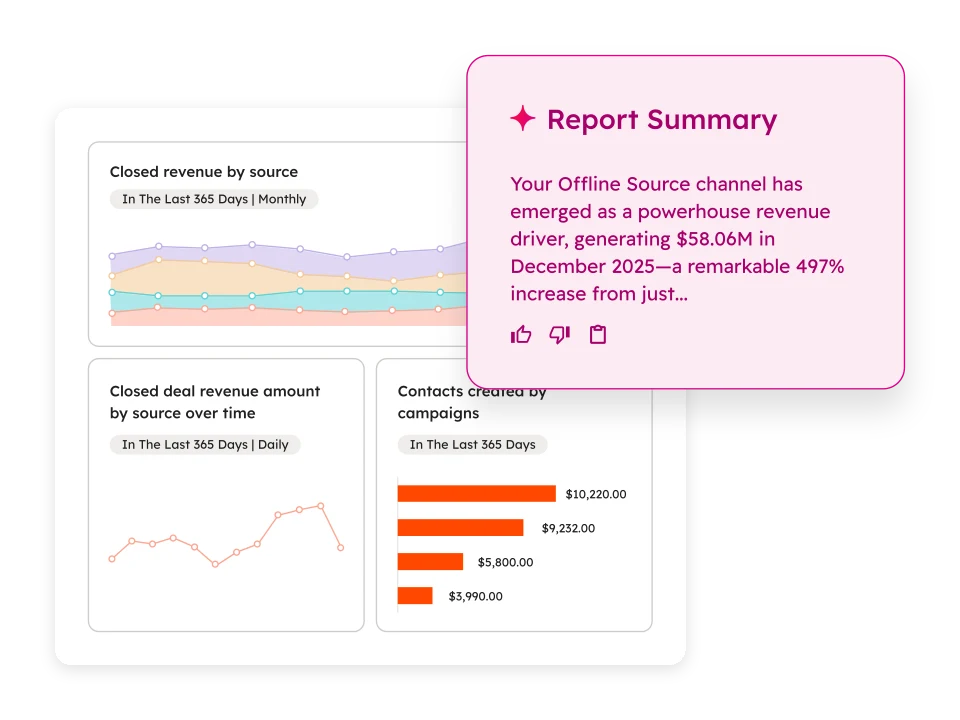
Reports you build once
Closed revenue by source, contacts by campaign, and the trend across the year. The dashboard is set up at the start and updates on its own; nobody exports to a spreadsheet again for the Monday meeting.
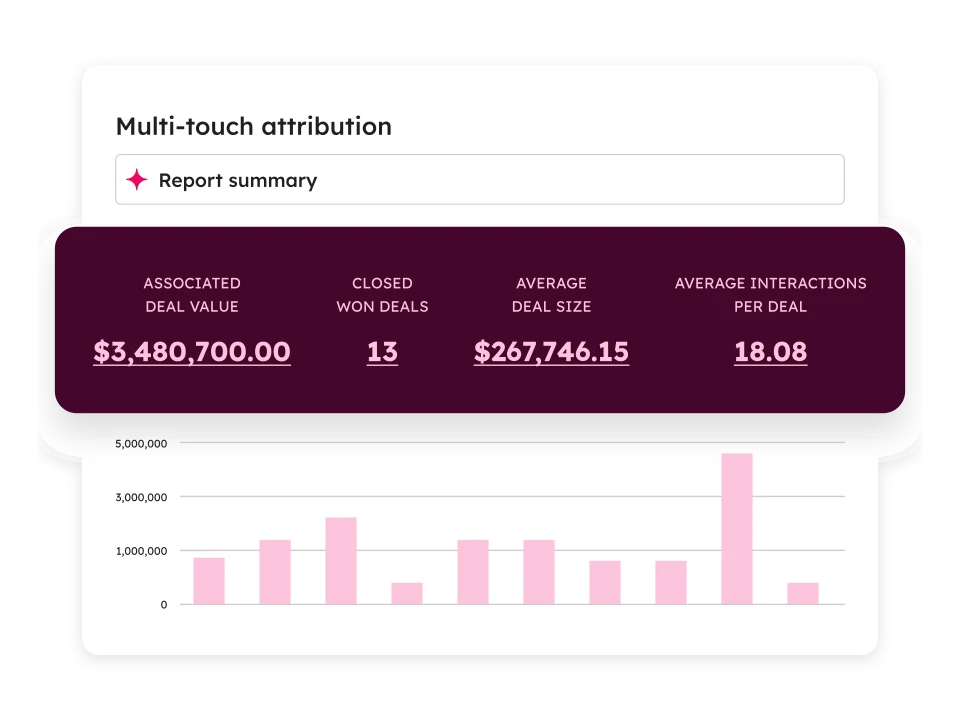
Multi-contact attribution
How many interactions it took to close a deal, and which channel brought them. It is the difference between giving all the credit to the last click and knowing which part of the funnel needs work.
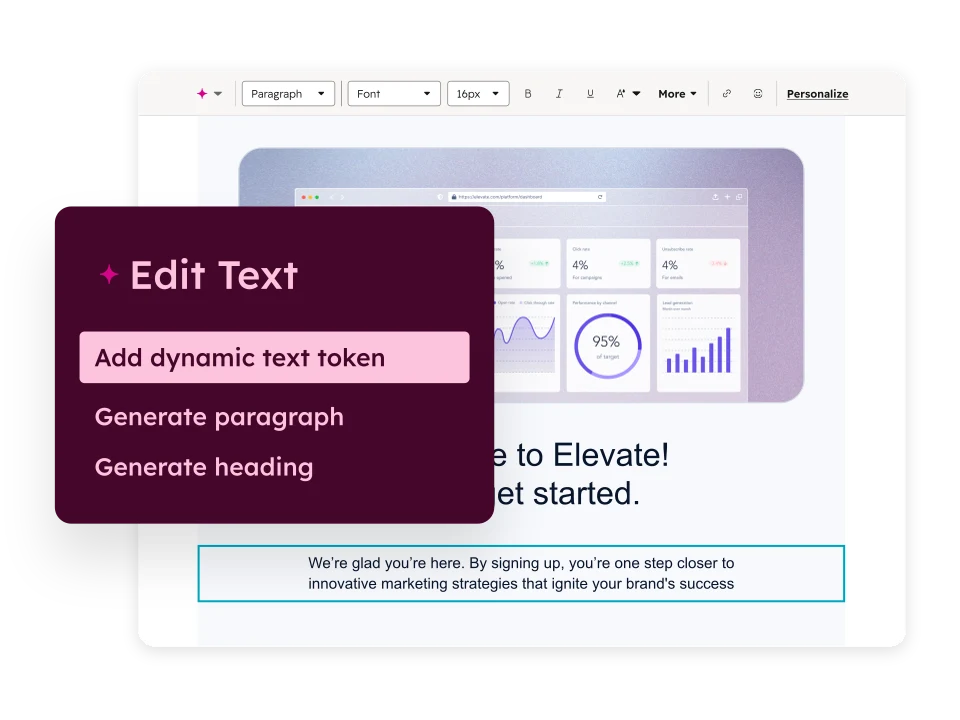
Content that uses contact data
Personalization tokens change the text according to the properties of the person receiving it, so one email reads differently for each segment without duplicating the template six times.
Portals we run today
Companies whose HubSpot we implemented, rescued, or still maintain. What gets built inside a portal cannot be shown in a screenshot, so here are the names.

Cincel
cincel.digital

Xepelin
xepelin.com

Cuac
cuac.ai

Mundi
mundi.io

Vinte
vinte.com.mx

Estela
estela.com
Five stages, with no surprises halfway through
Every stage ends with a specific deliverable you can review before we move to the next one.
- 01
Assessment
1–2 weeksWe interview the teams that use (or will use) the CRM, audit the portal if there already is one, and map your sales process as it works today, not as the manual describes it.
- 02
Solution design
1 weekWe define the architecture: objects and properties, the stages of each pipeline, assignment rules, permissions, and which integrations are needed. You approve it before we touch anything.
- 03
Implementation
3–8 weeksWe configure, migrate data, build automations, and integrate systems. We work in deliveries so you see progress every week, not only at the end.
- 04
Training and adoption
2–3 weeksWe train each team on its own workflow, with recorded material and reference guides. An implementation is worth nothing if the team does not use it.
- 05
Ongoing support
ContinuousWe review adoption metrics, adjust what is not working, and add automations as the process changes.
Frequently asked questions about HubSpot consulting
How much does HubSpot consulting cost?
It depends on scope: how many hubs, how much data has to be migrated, which integrations are needed, and how many hours of training. After the initial assessment—which is free—we send you a fixed proposal with scope, timeline, and investment.
Is the HubSpot license included?
No. You buy the license directly from HubSpot, and its cost depends on the hub and on how many contacts and users you have. As a partner, we help you choose the right plan so you do not pay for features you will not use.
We already have HubSpot, but nobody uses it. Can you help?
That is the most common situation. We start with an audit of the portal to find out why the team avoids it: usually processes that do not match how the business really works, too many required fields, or no training. We reconfigure the portal and train the teams again.
Can you migrate our data from another CRM?
Yes. We have migrated from Salesforce, Zoho, Pipedrive, Odoo, and spreadsheets. The migration includes cleaning and deduplicating records: moving dirty data into a new CRM only moves the problem.
What is a workflow, and why does it matter?
A workflow is an automation that runs actions when a condition is met: assign a lead to the right rep, send a follow-up email, create a task, or update a property. We have built more than 500 workflows, and they are what turns a CRM into a tool that works on its own.
Ready to grow?
Let's start by finding out where your CRM stands today
The initial assessment is free and ends with a findings report that is yours, whether or not you hire us.
Or email us directly at contacto@c2suite.com